Documentation
Abstract
QueryVerify is useful for developers who use AI to generate SQL queries and need to verify whether those queries will work in their environment. It automates the double-checking process by performing self-debugging step in an isolated sandbox, resulting in a working query that can be copied and adapted to specific needs. It is also beneficial for developers who forget SQL syntax or who are proficient in other programming languages, understand the underlying logic, but do not remember SQL syntax well.
Currently, the primary goal is to generate SQL code that is free from syntax errors.
What QueryVerify does?
- It generates an SQL query based on the user's prompt. The system then creates an isolated sandbox environment with the required tables and mock data inferred from the prompt and executes the query. If the generated query fails, the system attempts to fix it through a self-debugging iteration loop, with a maximum of four iterations.
- When using LLMs (GPT, Claude, etc.), you can generate very large SQL queries, but debugging and understanding errors can be time-consuming. Alternatively, you can generate queries using an LLM's step-by-step reasoning process; however, in that case, you still need to manually verify whether the generated query works correctly in an execution environment. QueryVerify automates these steps.
Real usage example:
At work, I was tasked with creating a custom report for a client. The task required getting the number of EntityA (let's say it was Products) by it's width and height, grouped by nested and one to many related categories.
And below is the prompt used for QueryVerify:
Here is the screenshot of the QueryVerify result:
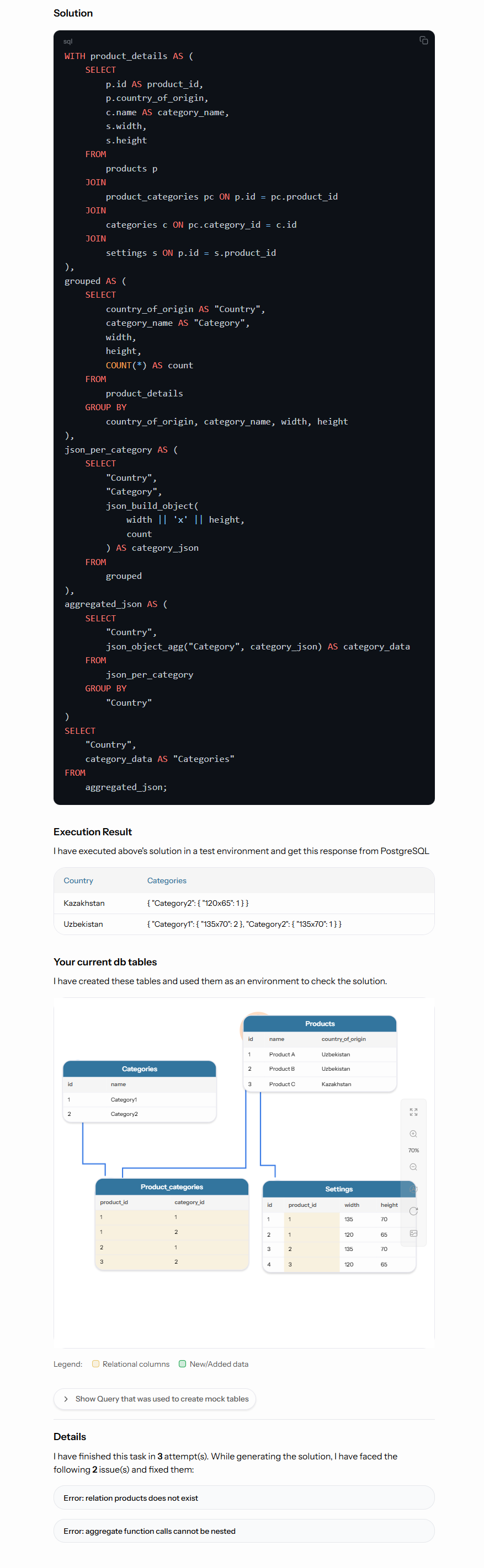
It generated the SQL query and completed the task in three attempts (see the bottom of the image). This means it generated an initial query to solve the task, executed it in a sandbox, encountered an error, fixed it, encountered another error, fixed it again, and finally produced a working SQL query and returned the execution result.
You can review the entire process step by step. By comparing the “Execution Result” with “Your Current DB Tables,” you can verify whether the query behaves as expected. We plan to further automate this verification process to assist users with validation. For more details, please visit Roadmap page.
And as you can see this method isolates the task and uses only required tables and columns. This was the main purpose of using the sandbox.
Instead of Scientific results
We have tested the `How to check if all {pattern}_id foreign columns have indexes or not through all tables` complex prompt with nano models and it was performed successfully in 2 iterations (with 1 error). That means this technique can be used to generate working SQL queries efficiently.
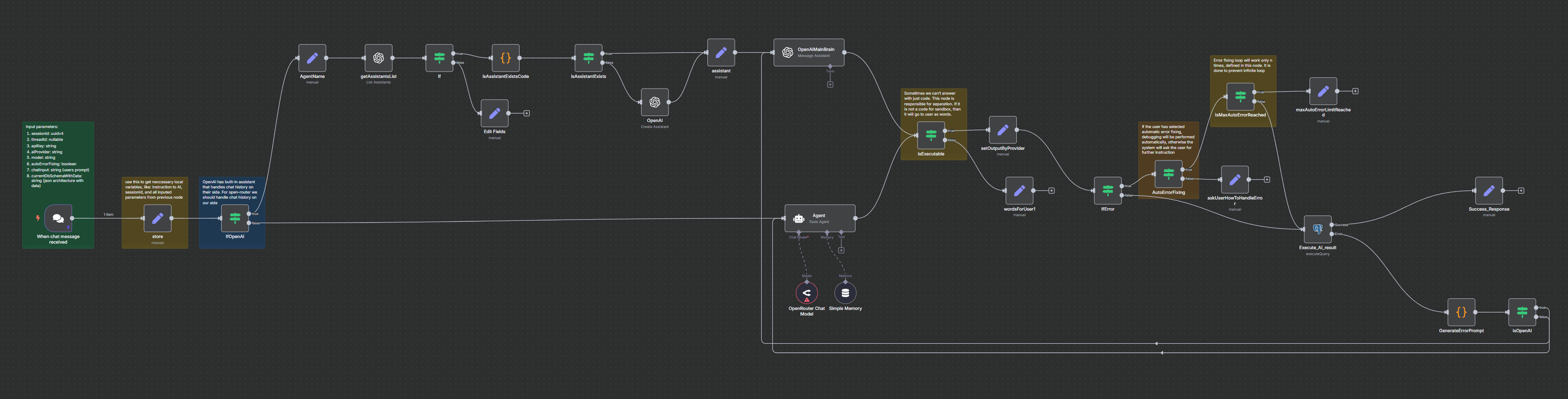
The core of our platform, Ai agent built on N8N, is now open source
View on GitHubContact us: contact@queryverify.com